What Is Access Control?
Yesterday we talked about Authentication vs Authorization — how a system verifies who you are versus what it decides you're allowed to do. Today let's zoom out and look at the bigger picture these two concepts live inside: Access Control.
If authentication and authorization are two gears in a machine, access control is the whole machine — the framework that ties identity, permissions, and resources together into one coherent security decision.
NIST defines it simply: access control is the process of granting or denying specific requests to (1) obtain and use information or services, and (2) enter physical facilities. In plain terms — it's the gatekeeper that decides whether a request gets a "yes" or a "no."
It's useful to break this gatekeeping into four distinct steps:
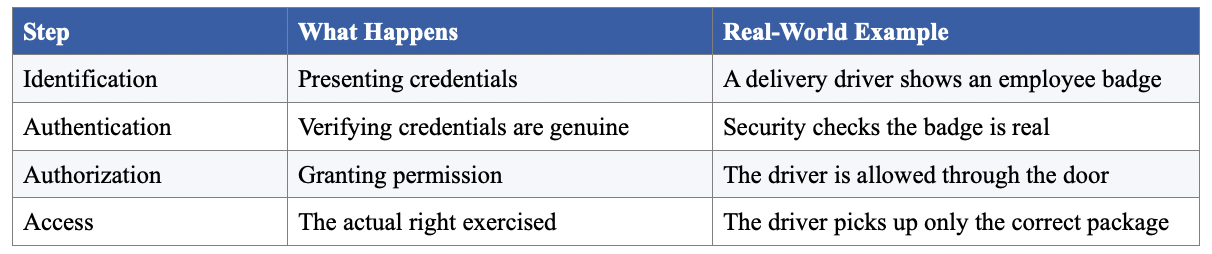
Notice how each step builds on the last — you can't authorize someone you haven't authenticated, and you can't authenticate someone who hasn't identified themselves.
The Core Model: Subjects, Objects, and a Reference Monitor
Every access control system, no matter how complex, boils down to three pieces:
- Subject — the active entity making a request (a user or a process)
- Object — the passive resource being accessed (a file, printer, or database record)
- Reference monitor — the "guard" that checks whether the request should be allowed
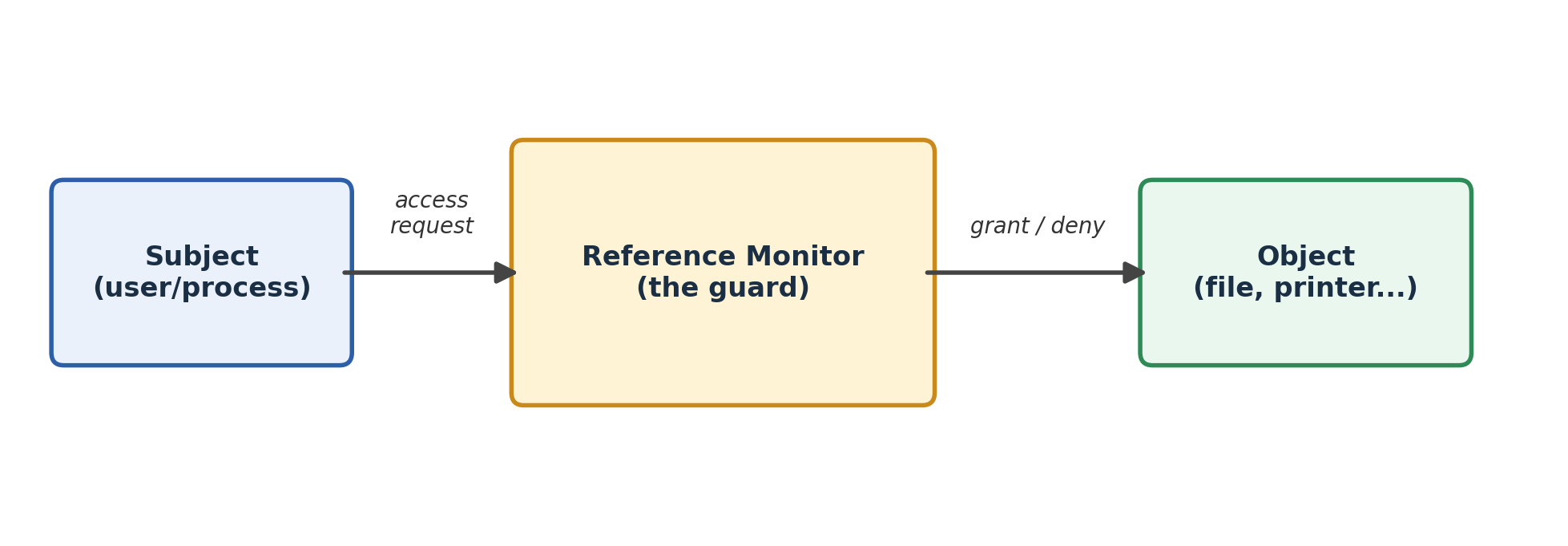
Think of a paper office with locked filing cabinets. The cabinets are the objects, the employees are the subjects, and the locks (plus who holds which keys) are the reference monitor. An access request is just someone trying a key in a lock.
What Can a Subject Actually Do?
At the most basic level, a subject can only do two things to an object: observe it or alter it. From these two "modes," the classic Bell-LaPadula model derives four access rights:
- Execute — neither observes nor alters (like running a program without reading its contents)
- Read — observes only
- Append (blind write) — alters without observing
- Write — both observes and alters
Interestingly, real systems don't always follow this cleanly. In Unix, write access to a file does not imply read access — a deliberate design difference from Bell-LaPadula. And in Windows NT-style systems, the vocabulary shifts again: rights are granted or revoked by others, but asserted or denied by the owner.
Who Gets to Set the Rules?
Every access control policy has to answer one governance question: who decides who gets access?
- Discretionary Access Control (DAC) — the resource's owner decides. If you create a file, you control who else can touch it.
- Mandatory Access Control (MAC) — a system-wide policy decides, regardless of what the owner wants. Common in high-security or military-grade systems.
Structuring Access: The Access Control Matrix
The cleanest theoretical model is the access control matrix — a grid with subjects as rows, objects as columns, and each cell listing exactly what operations that subject can perform on that object.
It's elegant on paper, but it falls apart at scale. Imagine thousands of files and hundreds of users — that's potentially millions of matrix cells, most of them empty. Two practical shortcuts emerged from this problem:
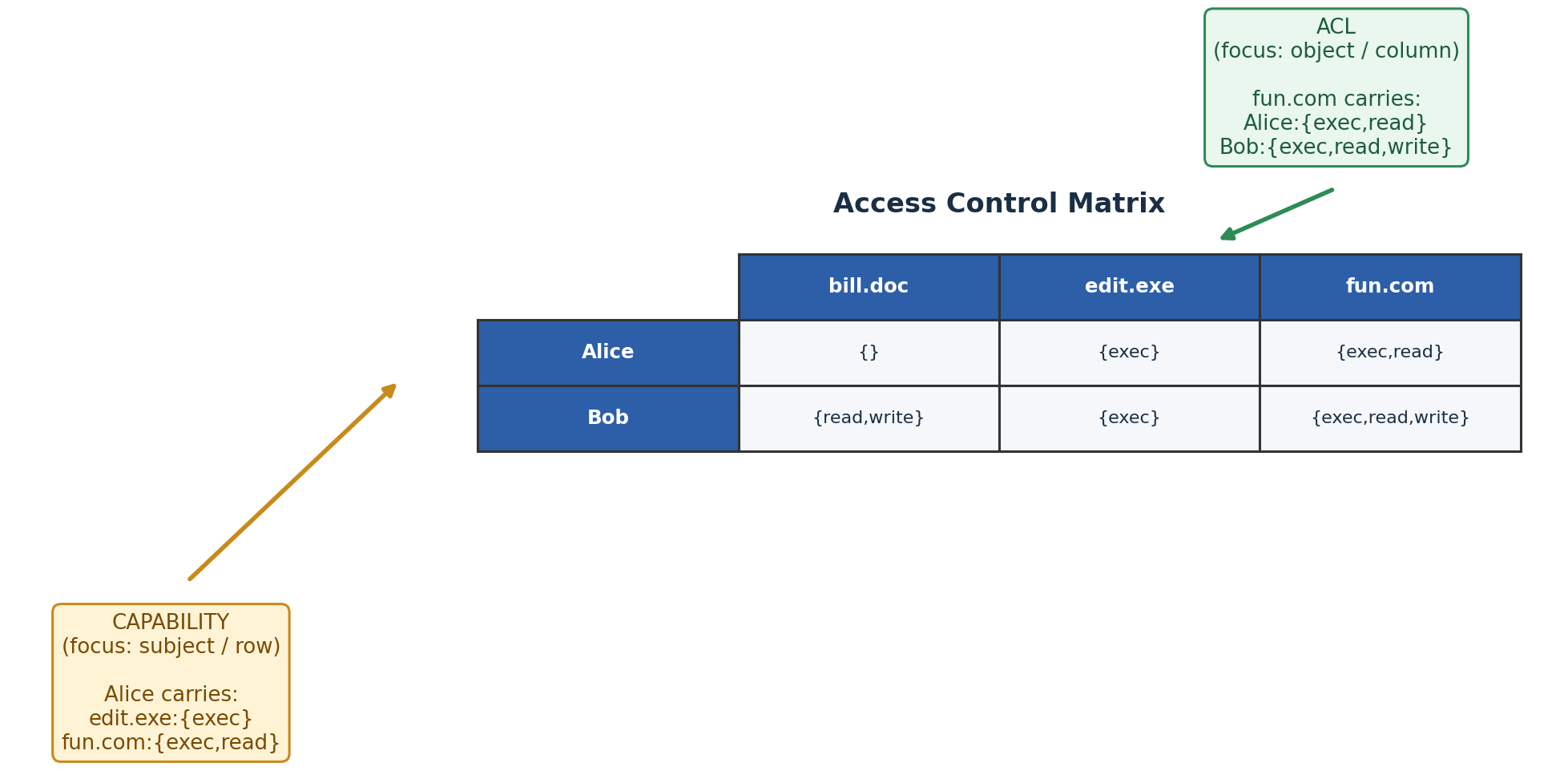
- Capabilities — store the matrix by row. Each subject carries a list of what it can access (like a keyring). Great for distributed systems where users roam, but hard to answer "who can access this object?" and hard to revoke.
- Access Control Lists (ACLs) — store the matrix by column. Each object keeps a list of who can touch it. This is the dominant approach in operating systems — Unix files, for instance, attach ACLs directly to themselves.
Scaling Up: Groups and Roles
Neither capabilities nor ACLs scale well when you have thousands of individual subjects. The fix is to insert an intermediate layer between people and resources.
Groups are the simplest version — bundle users together and assign permissions to the group instead of each person.
Role-Based Access Control (RBAC) takes this further by inserting roles, procedures, and data types between subjects and objects. Instead of asking "can Alice read this file," RBAC asks "does Alice hold the Teller role, and does the Teller role include the credit account procedure?"
A classic banking example makes this concrete:
- Teller → can credit and debit accounts
- Clerk → can transfer funds between accounts
- Administrator → can create new accounts (and inherits everything else)
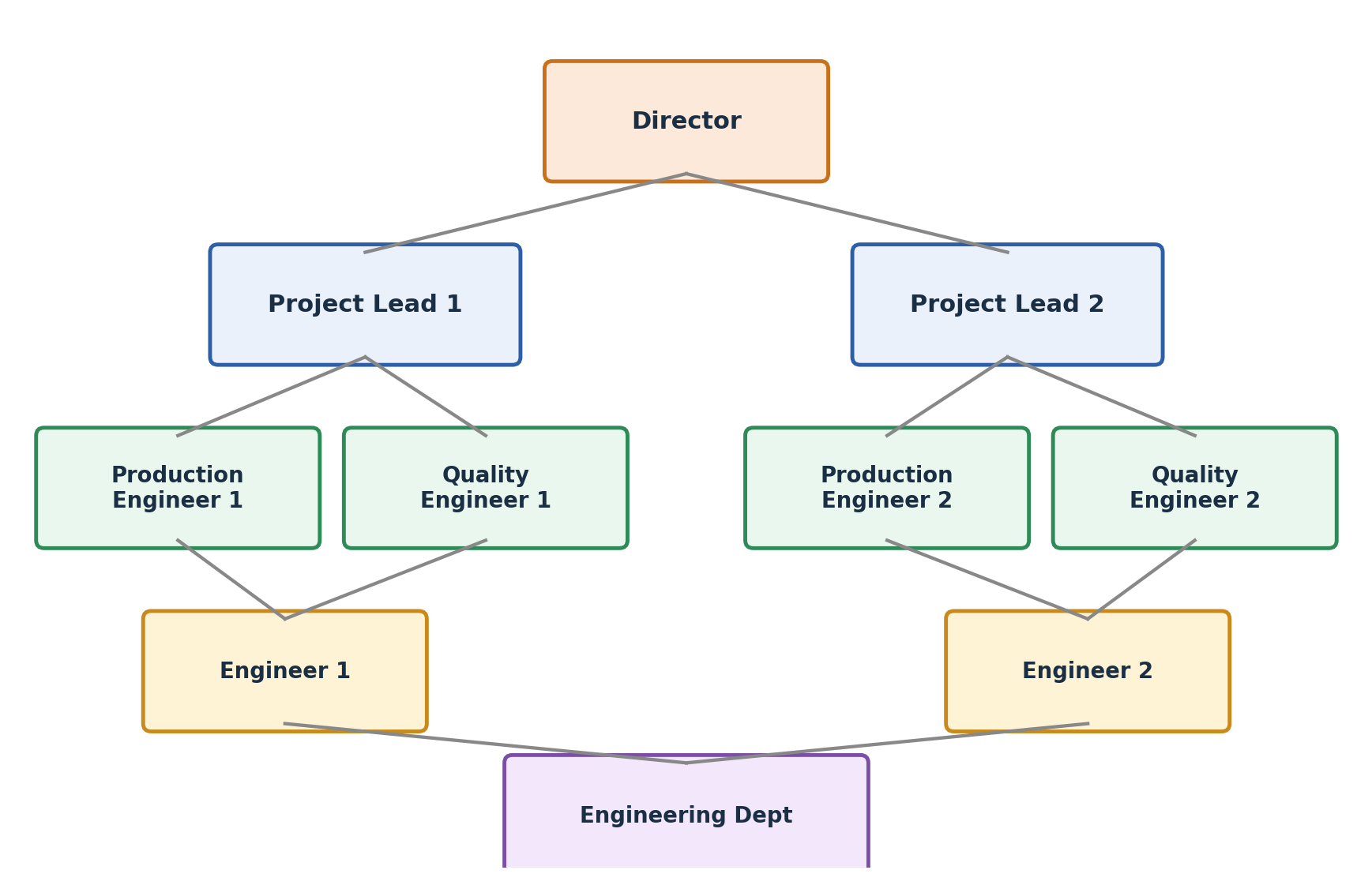
RBAC also supports role hierarchies (a Director inherits everything an Engineer can do) and constraints — like mutually exclusive roles, cardinality limits (only one department chair), or prerequisite roles (you can't be a Senior Analyst without first being a Junior one).
Unix in Practice
Unix is a great real-world case study because it implements several of these ideas at once:
- Every file has an inode storing its owner, group, and permission bits
- Permissions are split into three classes — owner, group, other — each with read/write/execute
- Special bits like SetUID, SetGID, and the sticky bit let programs temporarily borrow elevated rights or restrict who can delete files in a shared directory
- Modern Unix systems extend this with full ACLs, letting you name specific additional users or groups beyond the basic owner/group/other model
Multi-Level Security and the Bell-LaPadula Model
For environments where confidentiality is paramount — think classified government systems — access control uses security labels arranged in a lattice (a partial ordering where every pair of elements has both a "highest common ground" and a "lowest common ground").
The classic hierarchy is: unclassified → confidential → secret → top secret. But real systems often add compartments — categories like project names or departments — so two labels might be incomparable even if neither is higher than the other.
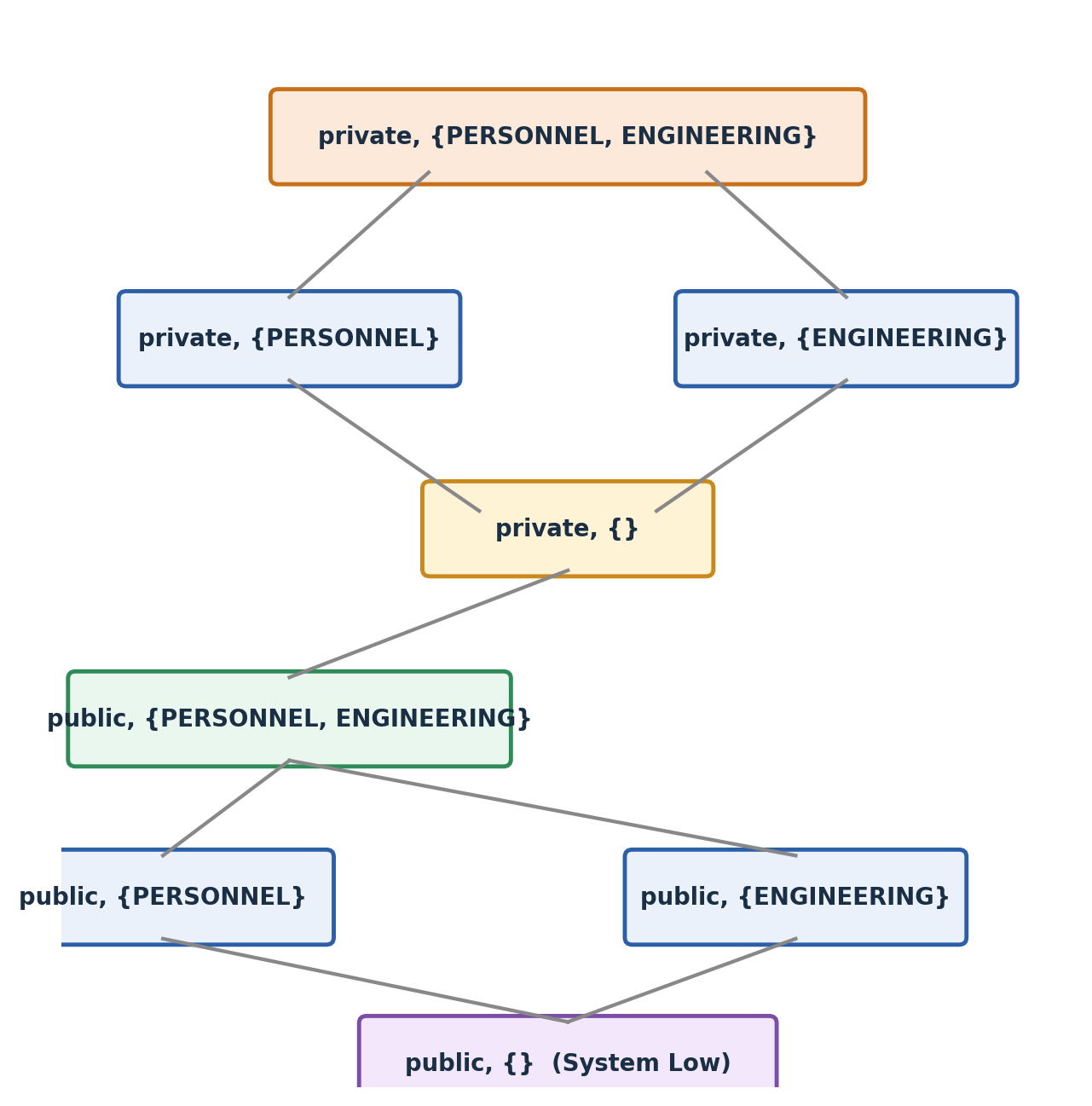
This lattice powers the Bell-LaPadula (BLP) model's two famous rules:
- No Read Up — you can only read objects at or below your own security level
- No Write Down — you can only write to objects at or above your own security level
The second rule feels backwards at first, but it exists to stop information leaking downward — imagine a Top Secret user accidentally (or maliciously) writing sensitive data to an unclassified printer. Together, these rules block a very specific attack: a piece of malicious code reading a highly classified file and then copying it into a low-security file where anyone could see it.
The Harrison-Ruzo-Ullman (HRU) Model
BLP is great at controlling information flow, but it says nothing about how access rights get created, granted, or revoked in the first place. The HRU model fills that gap with six primitive operations — create/delete subject, create/delete object, and enter/delete a right in the matrix — which can be combined into commands like "create a file and make its creator the owner" or "grant read access to another user."
The moral: the more expressive and flexible you make an access control model, the harder it becomes to prove it will always stay safe. There's a real tradeoff between flexibility and verifiability.
The Modern Approach: Attribute-Based Access Control (ABAC)
The newest model on the block ditches static roles altogether. ABAC makes access decisions based on attributes of three things:
- Subject attributes — name, job title, department
- Object attributes — file title, author, classification
- Environment attributes — current date/time, network security level, even active threat conditions
A single rule might read: "Allow read access if the subject's department matches the object's department AND the current network is not flagged as compromised." This flexibility is exactly why ABAC has become popular in cloud environments, where relationships between users and resources are constantly shifting.
Bringing It All Together
Access control isn't one technique — it's a spectrum of models, each solving a scaling or trust problem the last one couldn't:
- Access matrix → simple but doesn't scale
- ACLs / Capabilities → practical, object- or subject-focused shortcuts
- RBAC → groups permissions around jobs, not people
- MLS / BLP → protects confidentiality using strict information-flow rules
- ABAC → dynamic, context-aware permissions for modern, cloud-scale systems
Understanding authentication vs. authorization tells you how a system checks identity and permission. Understanding access control tells you how an entire organization designs, structures, and enforces those permissions at scale — which is really where the security engineering happens.